
A Detailed Mailing Report for Batch Shipments
A Firm Book Report is an itemized summary of all letters or packages included in a single shipment or batch.
If you send multiple mail pieces at once, especially through the Excel Batch Process, the Firm Book provides a clear record of what was mailed, to whom, and how much postage was paid.
While the SCAN Form serves as your official USPS proof of acceptance, the Firm Book acts as a detailed companion report for your internal records.
What Information Does a Firm Book Include?
A Firm Book Report contains:
- The USPS IMpb article number for each mail piece
- Mailers name and full address
- Postage amount for each mailing
- Certified Mail fee (if applicable)
- Return Receipt service (if selected)
- Total postage paid for the batch
- Return address / Mail Profile information
This allows you to quickly verify exactly what was included in a shipment.
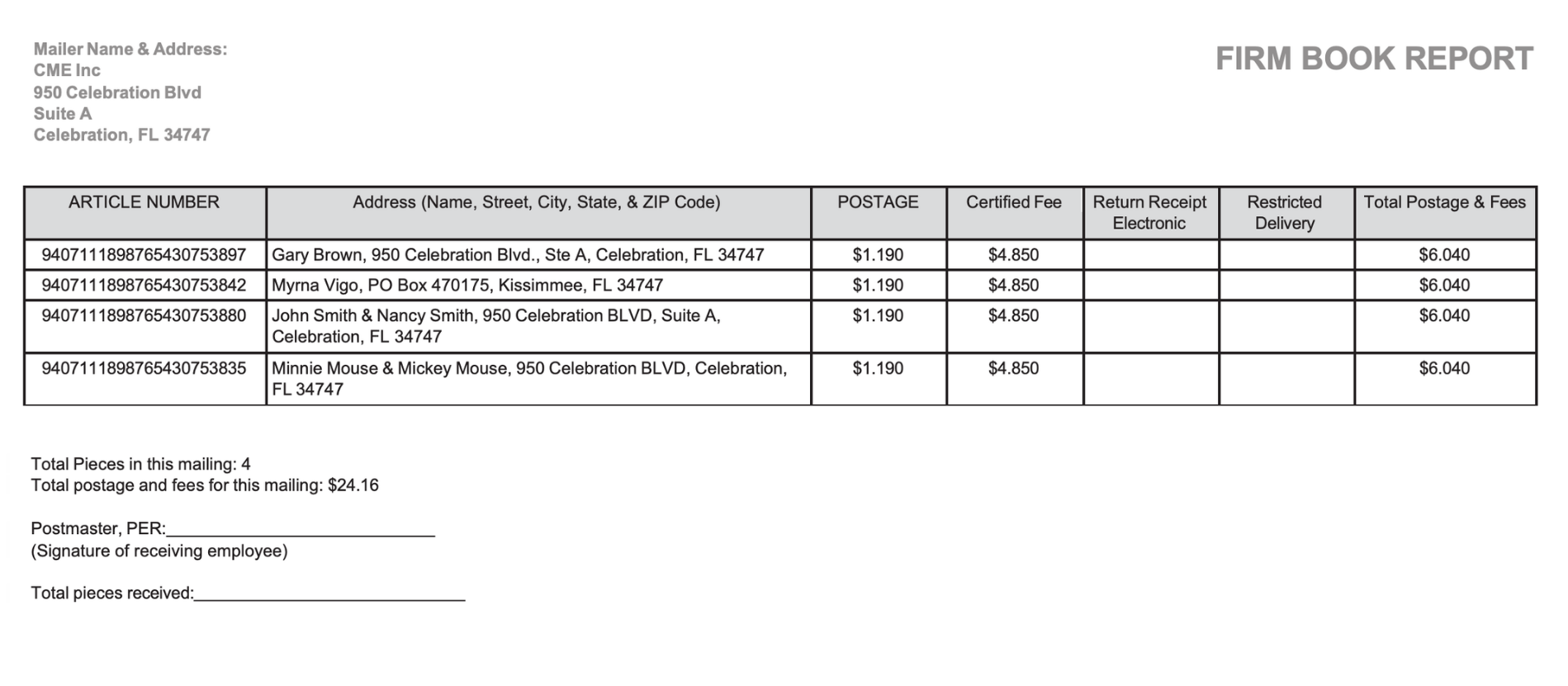 As shown in the Firm Book example, the report also clearly displays total postage paid (excluding the CML Electronic Delivery Confirmation fee)
Is a Firm Book Required for Proof of Mailing?
No. A Firm Book is optional and is not required for USPS proof of mailing.
The official USPS proof of mailing comes from:
- A SCAN Form Acceptance Scan
The Firm Book should be used alongside the SCAN Form to support your records, not replace it
When Should You Use a Firm Book?
A Firm Book is especially useful when you:
- Mail large batches of Certified Mail
- Need an internal mailing ledger for accounting
- Want a detailed breakdown of postage fees
- Send mail on behalf of clients
- Need organized documentation for audits
- Want additional documentation beyond tracking
It provides clarity and structure for compliance-driven mail workflows.
Can a Firm Book Be Used for First-Class Mail?
Yes. The Firm Book Report can be used as:
- Additional proof of mailing for your records
- Documentation when obtaining a USPS Certificate of Mailing for regular First-Class Mail
This makes it helpful even when sending non-Certified Mail through batch processing.
What Mail Types Support Firm Book Reports?
Firm Book Reports can be generated for:
- USPS Certified Mail®
- Priority Mail®
- Priority Mail Express®
- First-Class Mail®
when mailed through the Excel Batch Process at Certified Mail Labels
Firm Book vs. SCAN Form: What’s the Difference?
|
Feature |
Firm Book |
SCAN Form |
|
Itemized list of recipients |
✔ |
No |
|
Shows postage breakdown |
✔ |
No |
|
USPS acceptance scan |
No |
✔ |
|
Official proof of mailing |
No |
✔ |
|
Internal documentation |
✔ |
Limited |
Best practice: Use both together.
- The SCAN Form provides USPS acceptance documentation.
- The Firm Book provides the detailed shipment record.
Why Businesses Use Firm Books
Organizations that rely on Certified Mail Labels often need more than tracking numbers. They need organized documentation.
Common users include:
- Law firms
- HOAs
- Property managers
- Government offices
- Insurance companies
- Financial institutions
A Firm Book creates a clean, structured record that can be stored digitally and referenced later.
 Get Started Today
If you send batch mailings through Certified Mail Labels, you can generate a Firm Book Report directly from your account.

Need help understanding how Firm Books and SCAN Forms work together? Schedule a Live Demo with our Customer Support Team today! We’ll help you choose the workflow that supports your compliance needs.