
Send Certified Mail Online: Upload Your Letter, We Print, & Mail It
Sending USPS Certified Mail does not have to mean printing documents, folding letters, preparing envelopes, applying postage, completing Certified Mail forms, and taking the finished mail to the Post Office yourself.
With Certified Mail Labels Print & Mail, you can upload your document online and let us handle the physical mailing process.
For qualifying orders submitted before the current daily processing cutoff, your letter can be printed, prepared and entered into the USPS mailstream the same business day.
Your mailing record can then include:
- The document submitted for mailing
- The recipient address used
- A USPS Certified Mail tracking number
- Available USPS acceptance information
- USPS tracking history
- Electronic Delivery Confirmation
- Return Receipt Electronic when selected and supplied by USPS
- A notarized Affidavit of Mailing for full-service mailings
- Searchable mailing records available in your account for up to 10 years
You upload the letter. We handle the paper.
Start a Print & Mail Order Schedule a Live Demo
Can You Send Certified Mail Completely Online?
Yes. Certified Mail Labels gives you two ways to send USPS Certified Mail online.
| Option | How It Works | Best For |
|---|---|---|
| Print Your Own Certified Mail Label | Create the USPS Certified Mail label online, print it in your office, prepare the envelope, and give the finished mailpiece to USPS. | Offices that already have staff, printers and an outgoing mail process. |
| Upload Your Letter — We Print & Mail It | Upload the document and mailing information. We print the letter, prepare the envelope, apply the required postage and tracking, and deliver the finished mailpiece to USPS. | Legal, compliance, property, government, financial, insurance, collections and remote teams that want to eliminate physical mail preparation. |
Both workflows can keep available tracking and delivery records inside the same Certified Mail Labels account.
How Online Certified Mail Print & Mail Works
The full-service workflow moves your letter from a digital file to a documented USPS mailing without requiring your staff to touch the physical mailpiece.
1 Upload
Upload your PDF letter and enter or select the recipient address.
2 Select
Choose Certified Mail and any additional USPS service required for the mailing.
3 We Prepare It
Your letter is printed, folded, inserted, addressed and prepared with postage and tracking.
4 USPS Accepts It
The finished mailpiece is presented to USPS and available acceptance activity is captured with the mailing record.
5 Track & Archive
Follow USPS tracking, retrieve the EDC and available Return Receipt records, and retain the mailing history in your account.
Can Certified Mail Be Printed and Mailed the Same Business Day?
Yes. Certified Mail Labels offers same-business-day Print & Mail processing for qualifying submissions received before the current daily cutoff.
Orders submitted after the applicable cutoff move into the next available business-day processing cycle.
This can be useful when:
- A legal notice has a mailing deadline
- A remote employee cannot access the office mailroom
- A property manager needs a notice mailed while away from the property
- A compliance team needs a documented mailing created quickly
- A business wants to eliminate a trip to the Post Office
- A firm needs the physical mailing handled by someone else
Build sufficient time into any deadline-sensitive mailing. USPS delivery time and completed recipient delivery remain separate from the date the letter enters the postal system.
What Does the Print & Mail Service Handle?
Once the document and mailing information are submitted, the physical production steps are handled for you.
| Mailing Step | Print & Mail Service |
|---|---|
| Print the uploaded document | Handled for you |
| Fold the letter | Handled for you |
| Insert it into the envelope | Handled for you |
| Prepare the mailing address | Handled for you |
| Apply Certified Mail postage and tracking | Handled for you |
| Present the mailpiece to USPS | Handled for you |
| Monitor USPS tracking | Available in your account |
| Retain available mailing records | Up to 10 years |
What Proof Do You Receive After We Mail the Letter?
The value of a full-service mailing is not only that someone else prints the envelope.
The mailing also creates a documented record that can be easier to retrieve later.
Depending on the services selected and USPS activity, the record can include:
- The uploaded document
- The recipient address
- The Certified Mail tracking number
- A notarized Affidavit of Mailing for the full-service mailing
- Available USPS acceptance activity
- USPS processing and transit events
- Attempted-delivery events
- Final delivery information
- Electronic Delivery Confirmation
- Return Receipt Electronic when that service was selected and supplied by USPS
That gives legal, compliance and administrative teams more context than a tracking number written on a receipt.
What USPS Tracking Scans Will You See?
USPS tracking is an event history. It does not provide continuous GPS location data.
After USPS receives the mailpiece, tracking can show events as the letter moves through the postal system.
The Certified Mail tracking number and electronic label record exist. This is not the same as USPS accepting the physical letter.
USPS records receipt or acceptance of the mailpiece into the postal system.
USPS records movement through processing facilities and transportation points.
The mailpiece has entered the local delivery process.
USPS records the delivery outcome. Review the entire history rather than relying only on the latest line.
Example: Why You Should Read the Full USPS Tracking History
A Certified Mail piece can eventually display a final Delivered event even when it was not successfully delivered to the intended recipient.
For example, an unclaimed letter may be returned and ultimately marked delivered when USPS delivers it back to the sender.
Historical USPS tracking example showing acceptance, attempted delivery, an unclaimed letter, return to sender and final delivery back to the original sender.
 The lesson is important for compliance mail: do not interpret one tracking status without reading the full event history.
Learn how to read Certified Mail tracking scans
See the Certified Mail Labels Electronic Delivery Confirmation
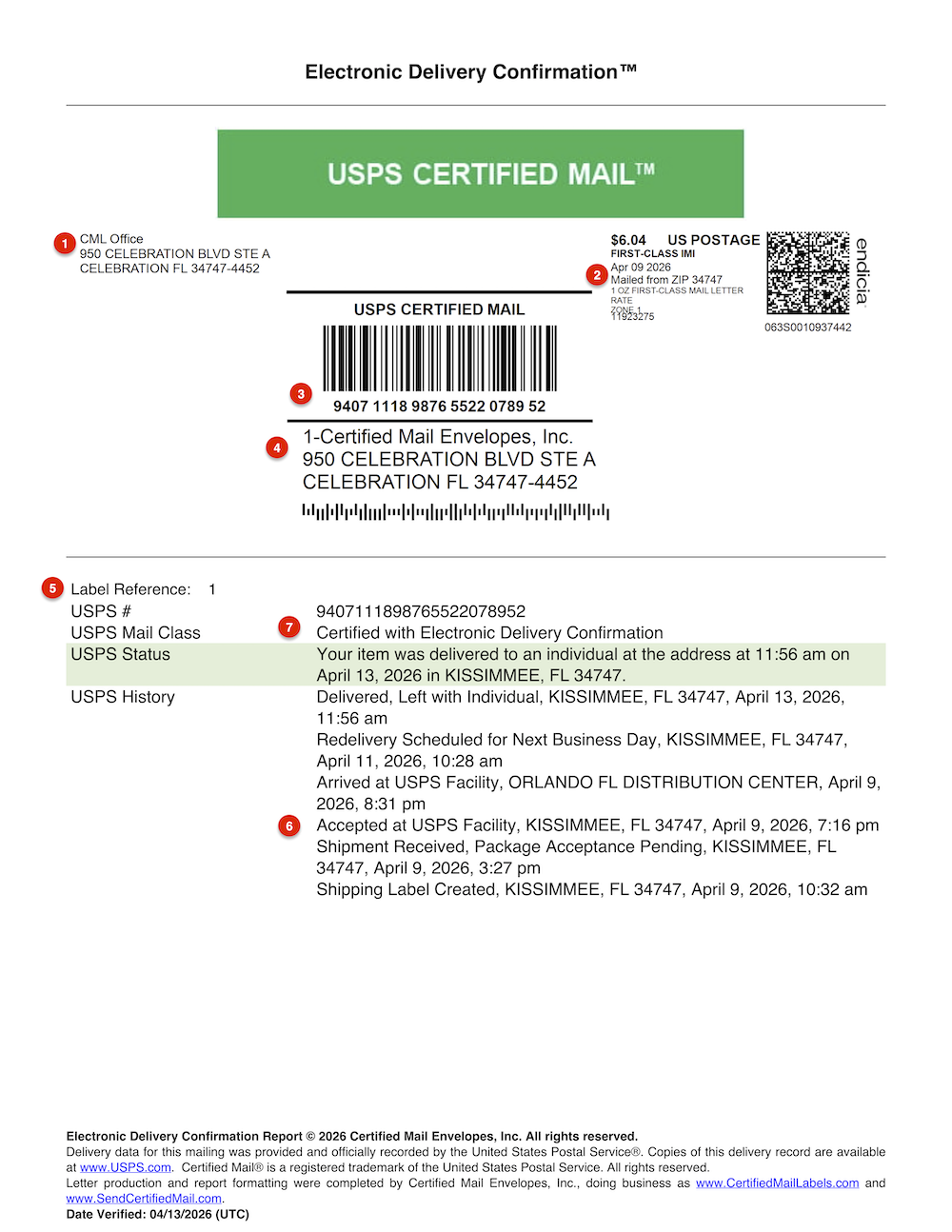
When a Certified Mail Labels mailing reaches a delivery event, the system can generate an Electronic Delivery Confirmation™ (EDC).
The EDC is a PDF mailing record that brings available information into one document instead of forcing staff to assemble separate tracking screenshots.
Example Certified Mail Labels Electronic Delivery Confirmation showing the label, tracking number and USPS event history.
What Does the EDC Include?
- Return address
- Delivery address
- Certified Mail tracking number
- Postage information
- Internal label reference
- Available USPS acceptance activity
- USPS tracking history
- Available delivery information
Electronic Delivery Confirmation records are stored in the Certified Mail Labels account and can be retrieved for up to 10 years.
See How Electronic Delivery Confirmation Works
Electronic Delivery Confirmation vs. Return Receipt Electronic
These records are related, but they are not interchangeable.
| Record | What It Provides |
|---|---|
| Electronic Delivery Confirmation | A CML PDF that organizes available mailing, USPS tracking and delivery activity for the Certified Mail piece. |
| Return Receipt Electronic | A separate USPS Return Receipt record that can include available recipient or authorized-agent signature information when the service was purchased at mailing. |
If the governing requirement specifically says Certified Mail, Return Receipt Requested, select the required Return Receipt service when the mailing is created.
Learn about Return Receipt Electronic
Full-Service Mailings Include an Affidavit of Mailing
When Certified Mail Labels handles the physical Print & Mail process, the mailing record can also include a notarized Affidavit of Mailing.
An Affidavit of Mailing is useful because it documents the fulfillment process separately from the later USPS delivery outcome.
That means your file can distinguish:
- What document was submitted
- Which recipient and address were used
- That the mailing was prepared
- USPS acceptance activity
- Subsequent tracking events
- The final delivery outcome
Whether an affidavit satisfies a particular legal or regulatory requirement depends on the rule governing that notice.
Your Certified Mail Record Stays Searchable for Up to 10 Years
The mailing may take only a few days. The record may matter years later.
Certified Mail Labels keeps available mailing, tracking and delivery information searchable in your account for up to 10 years.
For letters printed and mailed through the full-service workflow, the record can also preserve information connecting the submitted document to the mailing.
This can be useful during:
- Litigation
- Regulatory reviews
- Audits
- Property disputes
- Insurance matters
- Collections disputes
- Government reviews
- Tax matters
- Customer inquiries
- Internal compliance reviews
Explore Tracking & 10-Year Records
Who Uses Full-Service Online Certified Mail?
Print & Mail can be useful anywhere the organization needs a physical USPS mailing but does not want staff performing the production work.
Law Firms
Demand letters, statutory notices, probate, settlements and other matter-related mail.
Property Managers
Tenant notices, nonrenewals, lease violations and property correspondence.
Government
Tax notices, code enforcement, licensing and administrative correspondence.
Collections
Demand letters, account notices and legal collections correspondence.
Insurance
Claims, cancellation, nonrenewal, subrogation and policy correspondence.
Remote Teams
Staff who need to send physical compliance mail without access to an office mailroom.
Explore Certified Mail Solutions by Industry
Should You Print the Label Yourself or Let Us Mail the Letter?
| Need | Print Your Own Label | Full-Service Print & Mail |
|---|---|---|
| You already have the letter printed | Good fit | Usually unnecessary |
| You want to avoid printing and stuffing | You handle it | Best fit |
| You have no mailroom | Possible | Best fit |
| You want an affidavit tied to fulfillment | Not part of ordinary self-service preparation | Included in the full-service record |
| You need one urgent office letter | Good fit | Good fit |
| You work remotely | Requires printer and mail handoff | Best fit |
How Much Does Online Certified Mail Cost?
Certified Mail costs depend on:
- The underlying USPS mail class
- The weight and format of the letter
- The USPS Certified Mail fee
- Any optional USPS services
- The number of pages being printed
- The production or full-service mailing option selected
Because USPS prices change, this page does not hard-code current postage rates.
For current Certified Mail, Return Receipt, postage and related pricing, use the live rates page.
View Current Certified Mail Rates
Need to Print and Mail More Than One Letter?
The online workflow is not limited to one recipient.
Organizations with recurring or high-volume mail can also use:
- Excel and CSV batch workflows
- Custom references for cases, accounts, properties or matters
- USPS SCAN Forms for eligible batch acceptance
- API integrations
- Secure SFTP automation
- Custom Print & Mail work orders
Explore Batch Certified Mail Explore API & SFTP Automation
Common Online Certified Mail Mistakes to Avoid
1. Assuming Uploading the Letter Means USPS Has Accepted It
Document submission, production and USPS acceptance are separate stages. Use the available acceptance information in the mailing record when the handoff date matters.
2. Selecting Certified Mail When the Rule Requires Something Else
Some notices require First-Class Mail, Certificate of Mailing, personal service, posting, Return Receipt Requested or another method. Confirm the requirement first.
3. Forgetting to Purchase Return Receipt When It Is Required
Return Receipt is a separate USPS extra service and generally needs to be selected when the mailing is created.
4. Saving Only the Tracking Number
The full-service workflow is more valuable when the document, address, tracking history and delivery records remain connected.
5. Reading Only the Final Tracking Status
A returned Certified Mail piece can eventually receive a Delivered scan when it is delivered back to the sender. Review the complete history.
6. Using an Old Postage Price
USPS postage and extra-service prices can change. Use the current Certified Mail rates page rather than relying on an old article or saved price.
Frequently Asked Questions About Sending Certified Mail Online
Can I send Certified Mail online without going to the Post Office?
Yes. You can create a Certified Mail label online and prepare the envelope yourself, or upload the letter through the full-service workflow and have Certified Mail Labels print, prepare and mail it for you.
Can you print and mail my Certified Mail letter for me?
Yes. Upload the document and recipient information, select the mailing services, and Certified Mail Labels can handle printing, folding, inserting, postage preparation and USPS handoff.
Can my Certified Mail letter go out the same business day?
Qualifying Print & Mail submissions received before the current processing cutoff can be prepared and entered into the USPS mailstream the same business day. Later submissions move into the next available business-day processing cycle.
Does same-business-day mailing mean same-day delivery?
No. Same-business-day processing refers to preparation and USPS entry. Delivery time is determined by the underlying USPS mail class, destination, signature availability and other postal conditions.
What proof do I receive when Certified Mail Labels mails my letter?
The available record can include the submitted document, recipient address, Certified Mail tracking number, Affidavit of Mailing, USPS acceptance information, tracking history, Electronic Delivery Confirmation and Return Receipt Electronic when that service was purchased and supplied by USPS.
What is Electronic Delivery Confirmation?
Electronic Delivery Confirmation is a Certified Mail Labels PDF record that organizes available mailing, tracking and delivery activity for the Certified Mail piece.
Does Electronic Delivery Confirmation include a signature?
The EDC is not the USPS Return Receipt signature record. If you need the available recipient or authorized-agent signature, select an eligible Return Receipt service when the mailing is created.
Do you keep a copy of the letter?
For full-service Print & Mail, the mailing record can preserve information connecting the document submitted for fulfillment with the associated mailing record.
How long are my Certified Mail records available?
Certified Mail Labels keeps available mailing, tracking and delivery records searchable in the account for up to 10 years.
Can I send Certified Mail to a PO Box using the online service?
Certified Mail can be addressed to an eligible USPS PO Box. The recipient may need to complete pickup or delivery procedures required by USPS for accountable mail.
Can I add Return Receipt Electronic?
Yes, when the service is eligible for the mailing. Return Receipt should be selected when the mailing is created if your workflow requires the additional USPS return-receipt record.
Can I send hundreds of Certified Mail letters?
Yes. Certified Mail Labels supports Excel and CSV batch processing as well as API and secure SFTP workflows for recurring and high-volume mail.
How much does online Certified Mail cost?
The price depends on postage, Certified Mail services, optional Return Receipt services, document length and the mailing workflow selected. Review the current Certified Mail rates for live postage information.
Skip the Printing, Folding, Stuffing and Post Office Trip
If your goal is to send a physical Certified Mail letter without handling the physical mail, the Print & Mail workflow is designed for exactly that.
Upload the document. Select the recipient and mailing service. We handle the production and USPS handoff. You track the result online.
For legal and compliance teams, the benefit goes beyond convenience: the document, address, USPS activity, delivery information and available supporting records can remain connected in one searchable account.
Ready to Send Your Letter?
Create an account and start your Print & Mail order online.
Related Certified Mail Resources
- Current USPS Certified Mail Rates
- Certified Mail Tracking Scans
- Certified Mail Tracking Summary Report
- Electronic Delivery Confirmation
- Return Receipt Electronic
- USPS SCAN Form
- Excel Batch Certified Mail
- Certified Mail API & SFTP Automation
- Certified Mail Solutions by Industry
Certified Mail Labels provides mailing technology, production and postal services and does not provide legal advice. Mailing, service and documentation requirements vary by law, regulation, court rule, contract, agency procedure and circumstance. Confirm the delivery method and records required for your specific notice.