
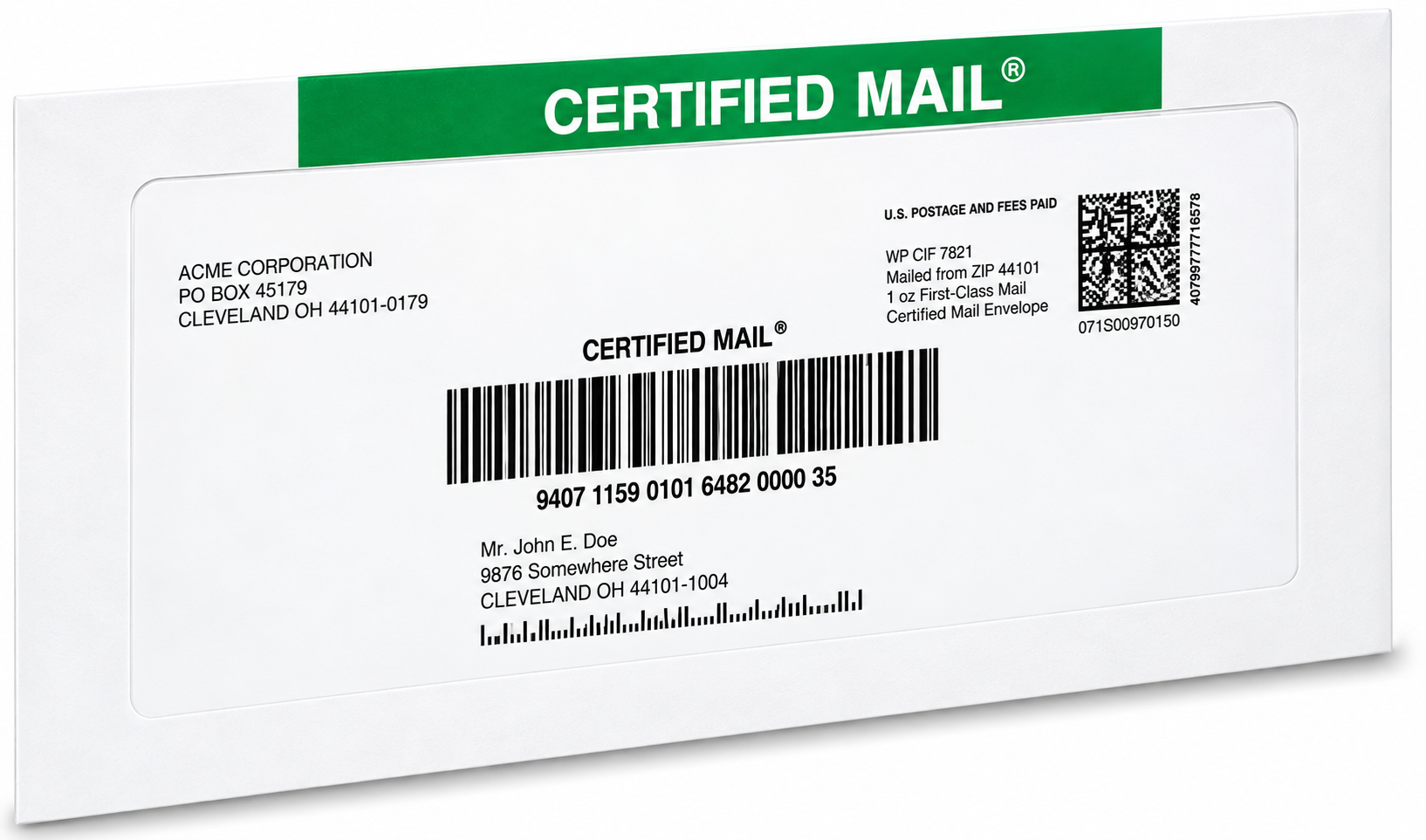
 A Certified Mail label is a printable sheet that carries live USPS postage, the Certified Mail barcode and article number, and the addresses you entered, so you can mail a Certified Mail piece without filling out a form by hand at a counter. You create it in a browser, pay for the postage, print it on a standard office printer or an adhesive sheet, attach it to your envelope, and hand the finished piece to USPS.
This page explains what is actually on the label, what happens between your printer and the USPS mailstream, and what you receive afterward. For the two end-to-end workflows, including the option where we print and mail for you, see our guide to sending Certified Mail online.
What Is on a Certified Mail Label
| Element | What it is | Why it matters |
|---|---|---|
| USPS postage | Live postage for the mail class and weight you selected | This is the payment itself, not a voucher to be settled at a counter |
| Certified Mail barcode and article number | The number USPS uses to identify the piece | This becomes your tracking number |
| Delivery address block | The recipient address exactly as you typed it | Printed addressing removes handwriting ambiguity and ZIP errors |
| Return address block | Your address | Where USPS returns the piece if it cannot be delivered |
| Extra service indicators | Marks for Electronic Return Receipt or Restricted Delivery when selected | Tells USPS which handling the piece requires |
USPS describes Certified Mail as a numbered extra service that provides a mailing receipt, requires a signature from the addressee, and can be combined with Return Receipt for proof of signature. Source verified on USPS: https://faq.usps.com/s/article/Certified-Mail-The-Basics.
What Actually Happens, Step by Step
Step 1: You Create the Label in a Browser
You enter the return address, the recipient address, the mail class, the envelope type, and the weight. The system then builds a label that carries live postage and a USPS Certified Mail article number. No software is installed, no meter is loaded, and no equipment is leased.
Step 2: You Pay for the Postage
Postage is purchased as part of the transaction, which is why the label is already paid when it prints. Payment funds an account balance that each label draws down. Ask the provider about account verification thresholds before a large first order, because some accounts need to be verified before high daily postage amounts can be purchased.
Step 3: You Print
Two print paths exist, and both use ordinary office hardware.
- Plain paper: the label prints on a standard sheet that is then attached to your own envelope.
- Adhesive label sheet: the label prints on a peel-and-apply sheet sized for your envelope.
- Certified Mail envelopes: preprinted envelopes that carry the USPS Certified Mail banner and a window positioned so the barcode and address are readable, which is the cleanest option for automated mailings.
Step 4: You Attach the Label Correctly
Barcode readability decides whether your tracking history starts cleanly. Keep the barcode flat and unwrinkled, do not tape over it, do not let a seam or window edge cross it, and keep the delivery address fully visible. If you use a window envelope, confirm the address and barcode sit inside the window rather than partly under the paper edge.
Step 5: You Hand It to USPS
This is the step that creates your acceptance event. You can present the piece at a retail counter, hand it to a letter carrier, or use a scheduled pickup where available. Dropping a piece into a collection box is the least documented route, because no acceptance scan is generated at the point of deposit.
Step 6: USPS Scans and Delivers
The piece then moves at the speed of the mail class you bought. Certified Mail does not have a separate delivery timetable. USPS records processing events, out-for-delivery, and then delivery or a delivery attempt. Certified Mail that cannot be delivered is held at the Post Office for 15 days and returned to the sender on the 16th day, per the USPS service description.
Step 7: You Collect the Record
Your account holds the mailing receipt information, the tracking history, the Electronic Delivery Confirmation, and the Return Receipt signature when that service was purchased. Nothing has to be filed by hand, and nothing depends on a green card finding its way back to your desk.
What the Label Replaces
A counter mailing involves a paper form, a handwritten address, a clerk-entered transaction, and a receipt you must physically keep. USPS identifies the counter receipt as PS Form 3800. An online label carries the same postage and the same article number, and the record lives in an account instead of an envelope.
What it does not replace is the physical handoff. Someone still has to get the piece into USPS hands, unless you use a full-service option.
Where Full-Service Fits
If printing and envelope assembly are the parts your team wants to stop doing, Print & Mail takes the process from Step 3 onward. You upload a PDF, we print it, fold it, insert it, address it, apply postage and tracking, and hand the finished mailpiece to USPS. Orders received by 5:00 PM Eastern go out the same business day, and every full-service mailing includes a notarized affidavit of mailing.
Nothing changes about the underlying mail. It is still USPS Certified Mail with a USPS article number and USPS tracking. What changes is who touches the paper.
Volume: One Label or a Thousand
- Single labels: create, pay, and print one piece at a time from the same account.
- Spreadsheet batch: upload a list and generate a label for each recipient, which removes repetitive typing and the errors that come with it.
- API and SFTP: connect your own system so mailing data flows in without manual upload, with USPS SCAN Forms for batch acceptance.
- Multi-user access: one account can serve multiple offices, departments, or teams, so records stay in one place instead of scattering across mailrooms.
What You Should Verify With Any Provider
- That the label carries live USPS postage and a real USPS Certified Mail article number, not a placeholder.
- Which extra services you can select at the time of mailing, including Electronic Return Receipt and Restricted Delivery.
- How long records are retained and whether you can search them by tracking number or recipient.
- Whether a batch acceptance method such as a USPS SCAN Form is supported.
- What happens if a label is rejected at acceptance, and what support is available at that moment.
Print Your First Certified Mail Label
Start with create and print live-postage Certified Mail labels online: no monthly fees, no contracts, no equipment lease, and no postage meter, and you pay less than Post Office counter rates. Prefer to stay hands-off? Our Print & Mail service prints your uploaded PDF, inserts it, applies postage, and hands the mail to USPS the same business day for orders received by 5:00 PM Eastern, and every full-service mailing includes a notarized affidavit of mailing. High-volume teams can run Excel/CSV batch label tool or API and SFTP automation with USPS SCAN Forms. Add Electronic Return Receipt for an electronic signature record, follow every piece with Certified Mail tracking, and keep the proof in your free 10-Year Compliance Archive. Current postage and service fees are always on the USPS postal rates page.
Certified Mail Labels is a mailing service and does not provide legal advice. Confirm the mailing method and proof your obligation requires with counsel or the issuing agency.
Frequently Asked Questions
How do Certified Mail labels work?
You create the label online by entering both addresses, the mail class, and the envelope weight, then pay for live USPS postage. The label prints on a standard office printer or an adhesive sheet with the Certified Mail barcode and article number on it. You attach it to your envelope and hand the piece to USPS, and the article number becomes your tracking number.
What is the difference between a Certified Mail label and PS Form 3800?
PS Form 3800 is the USPS receipt for Certified Mail used in counter transactions. An online Certified Mail label carries live USPS postage and the Certified Mail article number, and the mailing record is stored in your account rather than on a paper form you have to file.
Can I print Certified Mail labels on a regular printer?
Yes. Labels print on a standard office printer, either on plain paper that you attach to your envelope or on an adhesive label sheet. There is no special equipment, no postage meter, and no software installation.
Do I have to go to the Post Office after printing a Certified Mail label?
You have to get the piece into USPS hands, which can mean a retail counter, a letter carrier, or a scheduled pickup where available. If you want no physical handling at all, a full-service option lets you upload a PDF and the provider prints, prepares, and hands the letter to USPS for you.
Why is it better to hand Certified Mail to a counter or carrier instead of a collection box?
A counter or carrier handoff creates a USPS acceptance scan against your article number, which starts your documented timeline. A collection box deposit does not produce an acceptance scan at the point of deposit, so the early part of your tracking history is thinner.
How long does USPS keep a Certified Mail piece before returning it?
USPS states that Certified Mail will be held at the Post Office for 15 days and returned to the sender on the 16th day. Tracking shows the attempted delivery and the eventual return, so read the full history rather than the latest status line.